Eisenhower Matrix
The Eisenhower matrix, also called a time management matrix or urgent-important matrix, is a four-quadrant framework for deciding what to do now, what to schedule, what to delegate, and what to drop.
How the urgent-important matrix works
Priority Matrix brings the Eisenhower matrix into a shared app your team can use every day. Drag tasks between quadrants, collaborate in Microsoft Teams and Outlook, set reminders, and keep everyone focused on high-impact work.
The framework is sometimes called a time management matrix because it helps you schedule priorities instead of letting interruptions drive your day. When important work is not yet urgent, the goal is to protect time for it before it becomes a crisis.
Four quadrant prioritization
Each task belongs in one quadrant based on urgency and importance. Reviewing the matrix regularly helps teams stay aligned on what deserves attention now versus later.
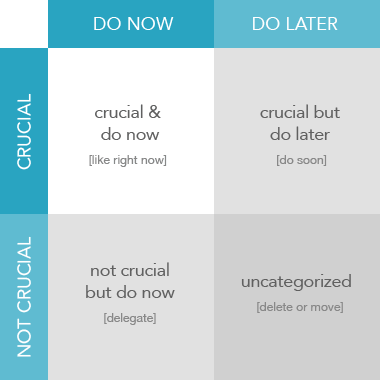
Important and Urgent
Crises, deadlines, and problems that need immediate attention.
Example: A customer escalation due today.
Recommended action: Do first.
Important but Not Urgent
Strategic work that drives long-term results but is easy to postpone.
Example: Planning, coaching, and process improvements.
Recommended action: Schedule and protect this time.
Not Important but Urgent
Interruptions and requests that feel pressing but do not move goals forward.
Example: Some meetings, notifications, and low-value requests.
Recommended action: Delegate when possible.
Not Important and Not Urgent
Distractions and busywork that consume time without meaningful payoff.
Example: Excessive social browsing or low-priority admin.
Recommended action: Eliminate or minimize.
Eisenhower matrix vs. a simple to-do list
A to-do list captures everything in one place, but it does not show which tasks are truly strategic. The Eisenhower matrix adds structure so you can see trade-offs between urgent interruptions and important long-term work.
Priority Matrix extends that model with shared projects, reminders, reporting, and integrations for Microsoft 365, Outlook, and Teams.
Using the Eisenhower matrix with Microsoft Teams and Outlook
Built for Microsoft 365
Use Priority Matrix in Outlook, Teams, and the web to keep priorities visible where work happens.
Shared team matrices
Align on the same urgent-important view so everyone knows what matters this week.
Templates and reminders
Start from proven matrix templates and use reminders to stay on top of quadrant two work.
Works across devices
Prioritize on desktop, web, and mobile so your matrix stays current wherever you work.
Frequently asked questions
Apply the Eisenhower matrix with your team
Start in Priority Matrix or import the time management matrix template.
Open Priority Matrix See what is new