Prioritize work by urgency and importance
Priority Matrix turns the Eisenhower matrix into a collaborative workspace for teams. Organize tasks into four quadrants, align on what matters most, and keep important work from slipping through the cracks.
What is the Eisenhower matrix?
The Eisenhower matrix is a four-quadrant prioritization method that separates urgent work from important work. Teams use it to decide what to do now, what to schedule, what to delegate, and what to eliminate.
Priority Matrix makes that framework practical by turning each quadrant into a shared workspace for tasks, projects, and follow-up.
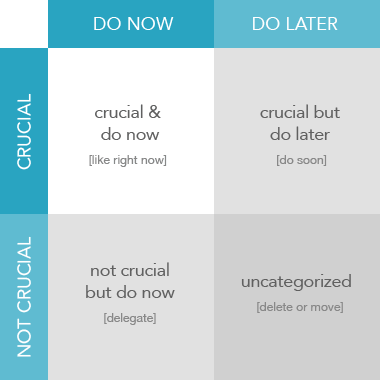
The four quadrants
Important and Urgent
Crises, deadlines, and problems that need immediate attention.
Example: A customer escalation due today.
Action: Do first.
Important but Not Urgent
Strategic work that drives long-term results but is easy to postpone.
Example: Planning, coaching, and process improvements.
Action: Schedule and protect this time.
Not Important but Urgent
Interruptions and requests that feel pressing but do not move goals forward.
Example: Some meetings, notifications, and low-value requests.
Action: Delegate when possible.
Not Important and Not Urgent
Distractions and busywork that consume time without meaningful payoff.
Example: Excessive social browsing or low-priority admin.
Action: Eliminate or minimize.
Why teams choose Priority Matrix
Built for Microsoft 365
Use Priority Matrix in Outlook, Teams, and the web to keep priorities visible where work happens.
Shared team matrices
Align on the same urgent-important view so everyone knows what matters this week.
Templates and reminders
Start from proven matrix templates and use reminders to stay on top of quadrant two work.
Works across devices
Prioritize on desktop, web, and mobile so your matrix stays current wherever you work.
Common questions
Start prioritizing with the Eisenhower matrix
Open Priority Matrix to organize work by urgency and importance with your team.
Open Priority Matrix